From first intake to on-time renewal, in one system built for certification.
Patients register and upload records online. Providers chart, sign and certify in one screen. Staff clear the state registry queue. Every expiration lands in a renewal list, so returning patients never slip through the cracks.
- Provider-only decisions, never auto-approved
- Signed notes locked in the database
- White-label patient portal
- Per-clinic data isolation
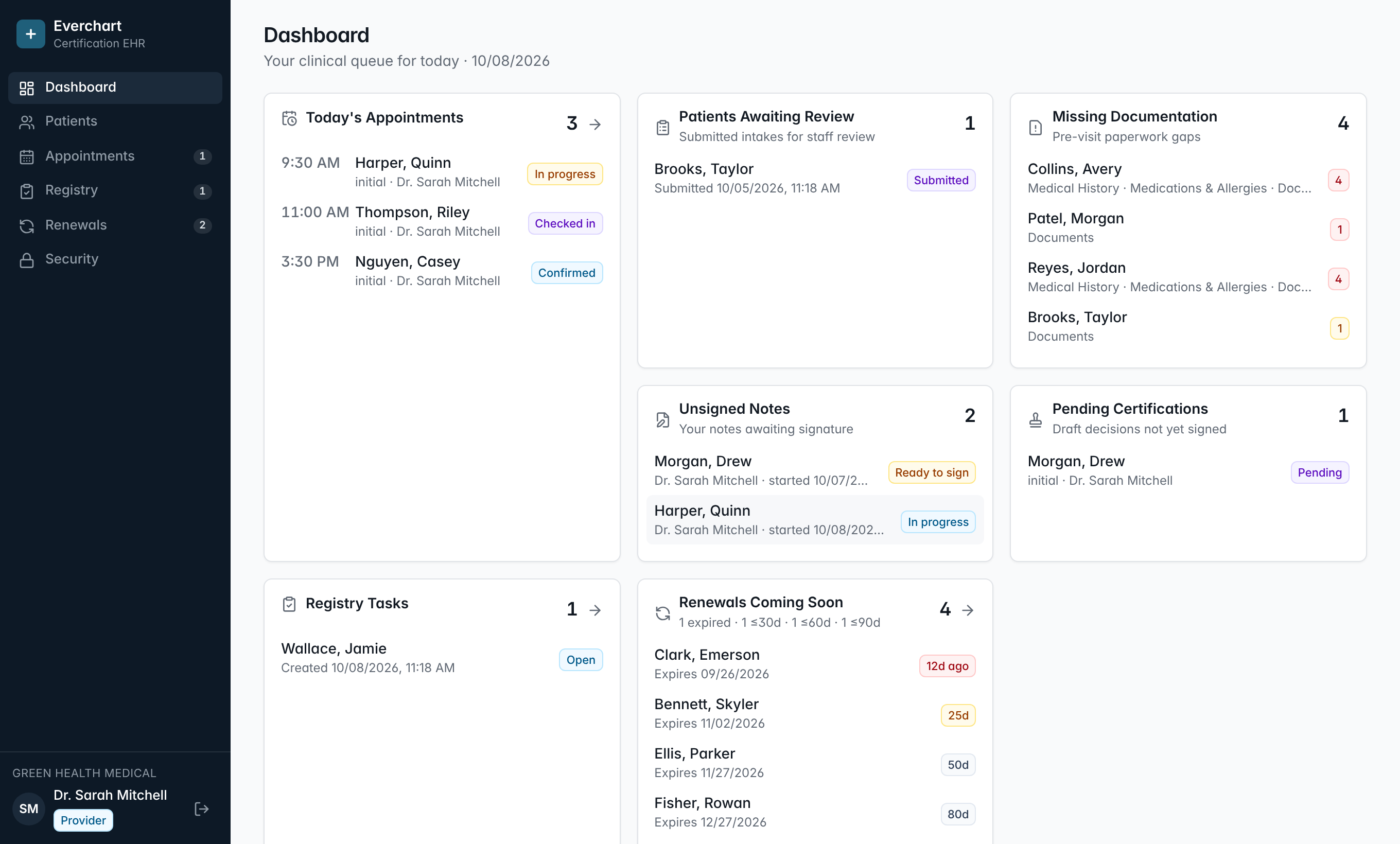
General-purpose EHRs weren't built for the certification visit.
Cannabis clinics run a different loop: evaluate, certify, register with the state, and do it all again before the card expires. That loop is where revenue leaks.
Renewals slip away
Expiration dates live in charts nobody re-reads. Patients lapse, then go to whichever clinic reminds them first.
Registry work is invisible
State registry steps happen in another window, tracked on paper. Nobody can tell what's done, blocked or forgotten.
Paperwork chases patients
Staff spend visits collecting history, IDs and records that patients could have submitted from their phone.
The EHR built around the medical cannabis certification loop.
Everchart is web-based EHR and practice management software for medical cannabis (medical marijuana) certification clinics. It connects online patient intake, provider charting, the certification decision, state registry work and renewals in one system.
- It runs in a web browser for staff, providers and patients. No app download is required.
- Only a licensed provider can record and sign a certification decision. The software never decides eligibility and never auto-approves.
- Each clinic configures its own state program terminology, certification length and registry steps. No state's rules are hardcoded.
- Signed notes and signed certification decisions are locked at the database level. Changes are added as dated amendments and the original is preserved.
- Every approved certification feeds a renewal pipeline grouped by expired, 30, 60 and 90 days until expiration.
- The patient portal can carry the clinic's own name, logo, colors and custom domain.
Every step of the certification loop, in order, in one place.
- 01Patient registers online
- 02Intake & history
- 03ID & records uploaded
- 04Visit scheduled
- 05Provider charts
- 06Note & decision signed
- 07State registry completed
- 08Renewal on time
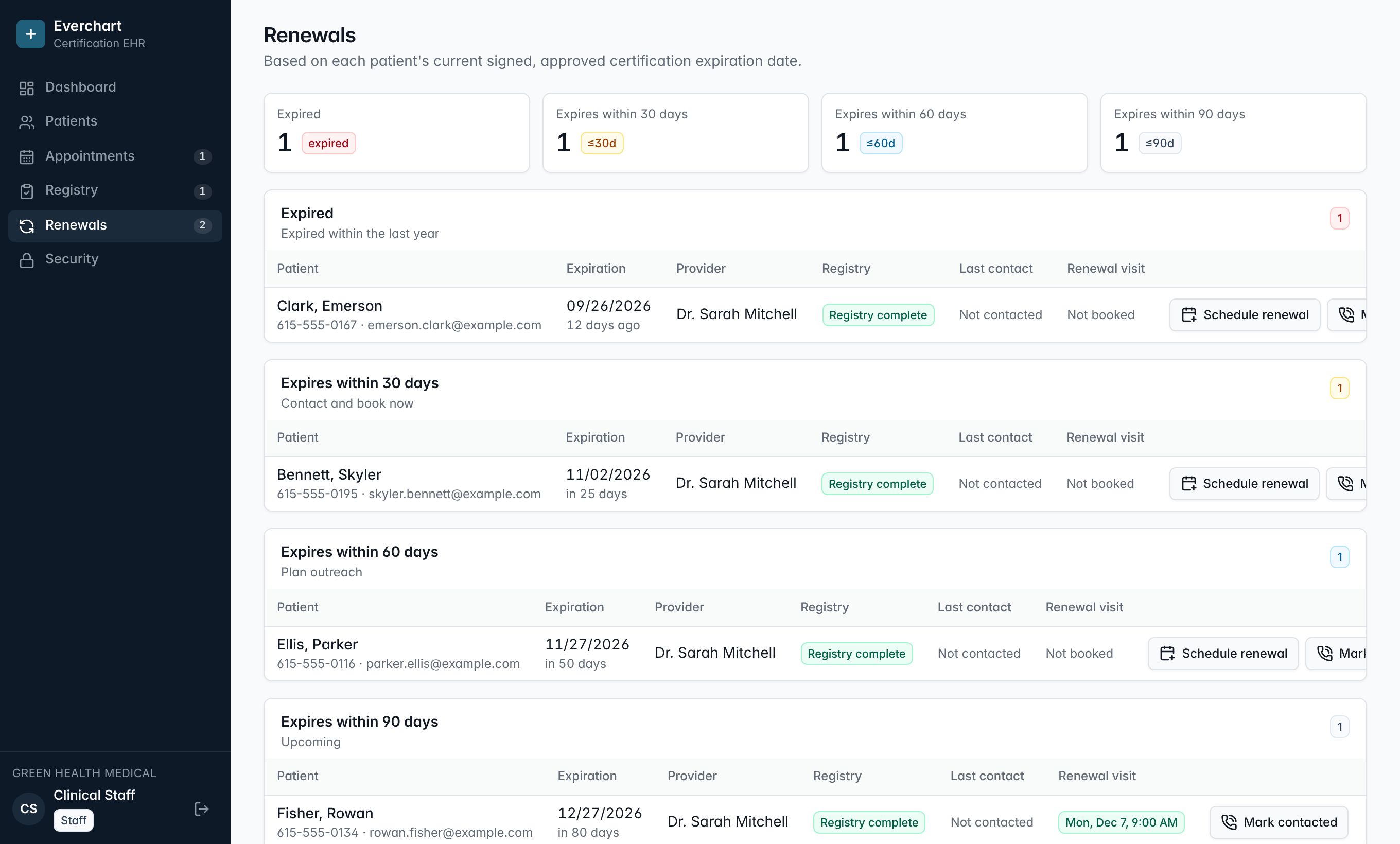
Turn expiration dates into booked renewal visits.
Every signed, approved certification feeds a renewal pipeline grouped by how soon it expires. Staff see who to call, log the outreach, and book the visit in two clicks.
- Expired, 30, 60 and 90-day groups built from real expiration dates
- Outreach log so the team never double-calls a patient
- Patients see a renew button in their portal as their date approaches
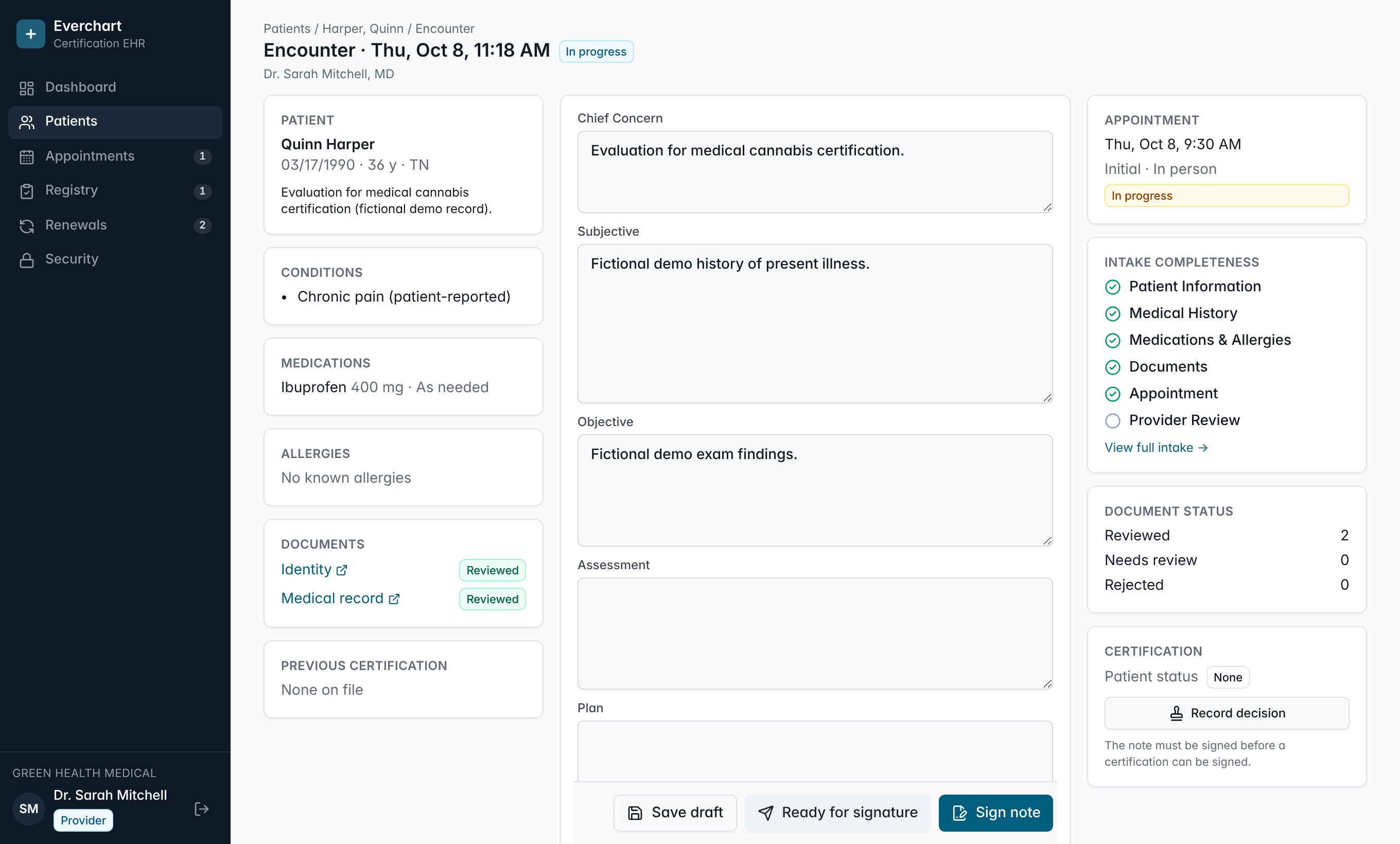
Chart, sign and certify without leaving the screen.
Patient history, medications, allergies and documents on the left. A fast SOAP note in the middle. Appointment, intake completeness and certification status on the right.
- Signing locks the note; changes become a dated amendment and the original is preserved
- Certification type, decision and dates are always the provider's explicit choice
- Nothing is ever auto-approved by the software
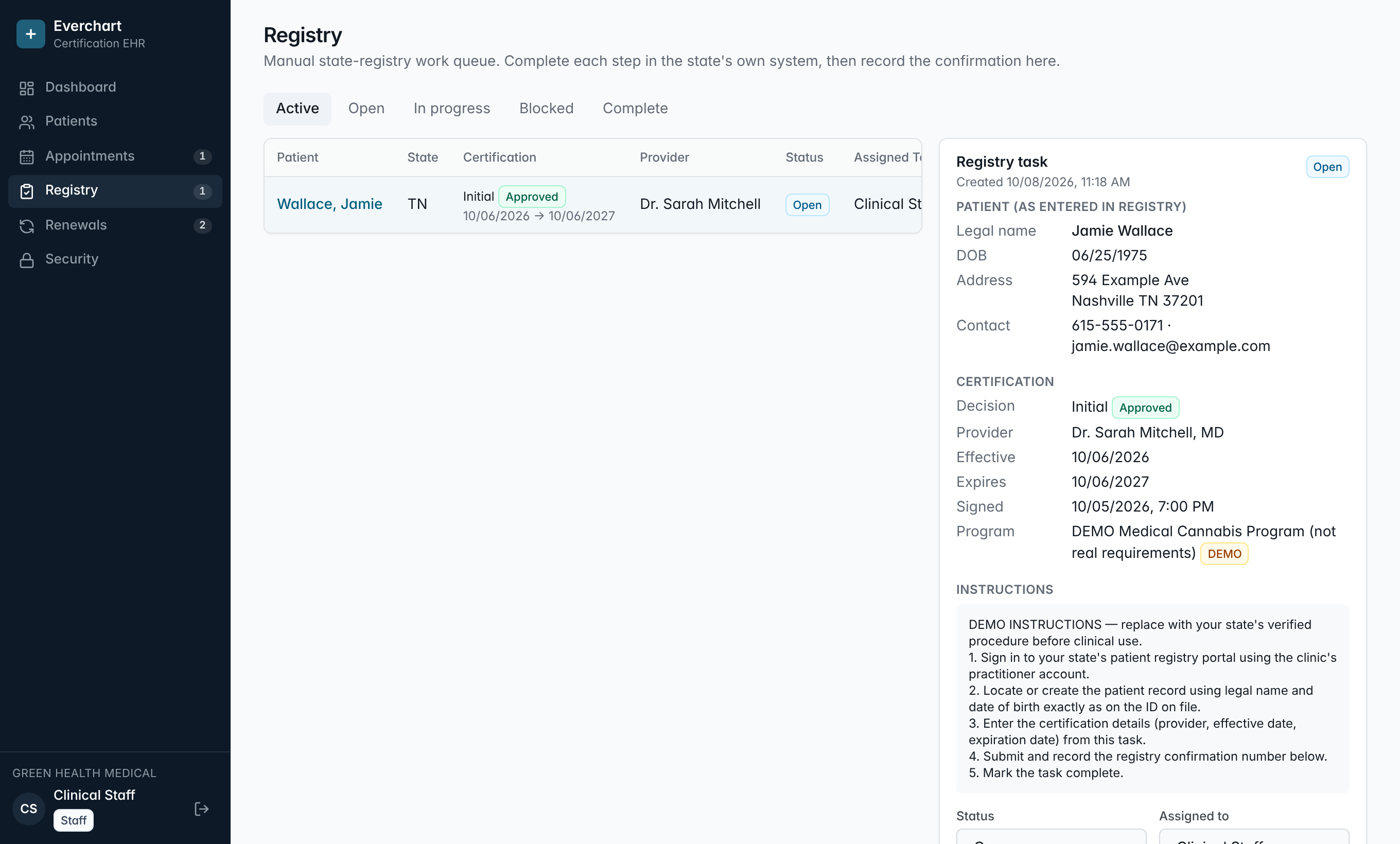
Make registry work visible, assignable and finished.
Each approved certification becomes a task with the exact patient and certification details your staff need, plus your state's step-by-step instructions.
- Assign tasks, mark them blocked with a reason, and track who completed what
- Record the registry confirmation number right on the task
- No bots in government portals; your staff stay in control
Your brand. Your domain. Paperwork done before the visit.
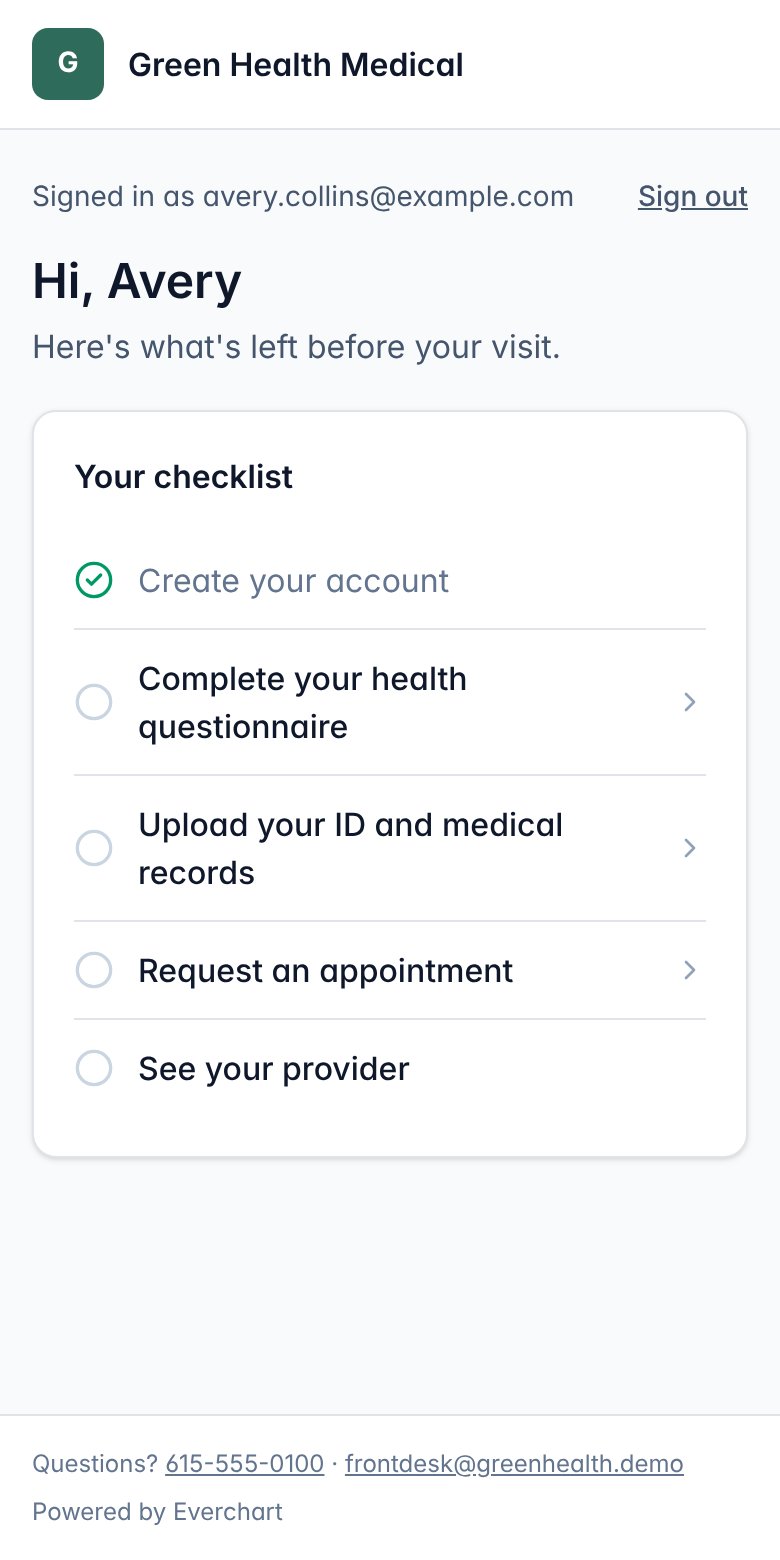
Patients register, answer their health questionnaire, upload their ID and records from their phone, and request a visit. It all lands in the chart, flagged as patient-submitted, for staff to review.
- Your logo, colors and custom domain
- Passwordless sign-in with one-time codes
- Phone-camera uploads for ID and records
- Visit requests your staff confirm
Built for certification, not adapted to it.
| Capability | Everchart | Typical setup today |
|---|---|---|
| Renewal pipeline grouped by expired, 30, 60 and 90 days | Manual lookups or reminder texts | |
| State registry work queue with confirmation numbers | Sticky notes and spreadsheets | |
| Signed notes locked at the database level; amendments keep the original | Editable notes or add-on modules | |
| Only providers can sign decisions; nothing is auto-approved | Varies | |
| Patient intake, uploads and visit requests in a white-label portal | Generic forms or a vendor-branded portal | |
| Append-only audit trail of every view and change | Limited or extra cost | |
| Each clinic's data isolated in the database itself | App-level filtering |
What are lapsed renewals costing you?
Plug in your own numbers.
Illustrative estimate using your numbers, not a guarantee of results.
Records you can defend.
Medical cannabis now draws real clinical scrutiny. Your documentation should hold up to it.
Clinic-level isolation
Every record is tied to its clinic and enforced by the database itself, not just the screen.
Locked signatures
Signed notes and certification decisions can't be edited or deleted, even by direct database access.
Append-only audit log
Logins, chart views, signatures and registry work are recorded with who and when, never with clinical text.
Role-based access
Admin, provider and staff roles. Only providers can sign notes and certification decisions.
Private documents
File types are verified from contents, stored privately, and opened through short-lived signed links.
Separate patient accounts
Patients sign in separately and can only ever see their own record at their own clinic.
Run a better certification clinic.
How to Run a Medical Cannabis Certification Clinic: The Operating Workflow
The end-to-end operating workflow of a medical cannabis certification clinic, from first contact and intake to the provider visit, state registry and on-time renewal.
How to Reduce Lapsed Medical Cannabis Certification Renewals
A practical playbook for keeping medical cannabis patients from lapsing: track expirations, start outreach early, log every contact and make rebooking effortless.
How to Choose an EHR for a Medical Cannabis Clinic: Buyer's Checklist
A vendor-neutral checklist for choosing an EHR or EMR for a medical cannabis (medical marijuana) certification clinic, with the questions to ask on every demo.
Questions clinics ask
Does the software decide whether a patient qualifies?
No. Everchart never evaluates eligibility or suggests a decision. Only a licensed provider can record and sign a certification decision, and every new certification starts as Pending until they do.
Which states do you support?
Clinics in any medical cannabis state. You set your state program's terminology, certification length and registry steps, so the workflow matches how your state works. We don't hardcode or guess at legal requirements.
Do patients need to download an app?
No. The patient portal works in any phone or computer browser. Patients sign in with a one-time code, so there's no password to forget.
Can the patient portal use our own name, logo and domain?
Yes. Set your name, logo, brand color, welcome message and support contacts, point your own domain (like portal.yourclinic.com) at it, and turn off "Powered by Everchart" for a fully white-labeled experience.
Is it HIPAA compliant?
The software is built with the safeguards HIPAA expects: role-based access, per-clinic data isolation, an append-only audit log, locked signed records and private document storage. Compliance also depends on hosting agreements and your clinic's policies, so we'll walk through a BAA-backed production setup with you before any real patient data goes in.
Do you include telehealth video or payment processing?
Not built in yet. Visits can be marked as video, and you keep using your current video and payment tools for now. Both are on our roadmap; tell us what you use and we'll prioritize accordingly.
How long does it take to get started?
Your clinic workspace, staff accounts and branded patient portal can be ready in a day. We'll scope moving your existing patient list and certification dates with you on the demo.
See your clinic's workflow running in 30 minutes.
We'll walk through intake, charting, registry and renewals using your state's process, and set up your branded portal.
- A live walkthrough, not slides
- Your branded patient portal, ready to try
- Founding clinics get locked-in pricing and hands-on onboarding