Registry work your whole team can see, assign and finish.
When a provider signs an approved certification, Everchart creates a registry task containing the patient and certification details staff need, plus your state program's own step-by-step instructions. Staff assign tasks, mark them blocked with a reason, and complete them by recording the registry confirmation number. Everchart never logs in to or submits to government portals automatically.
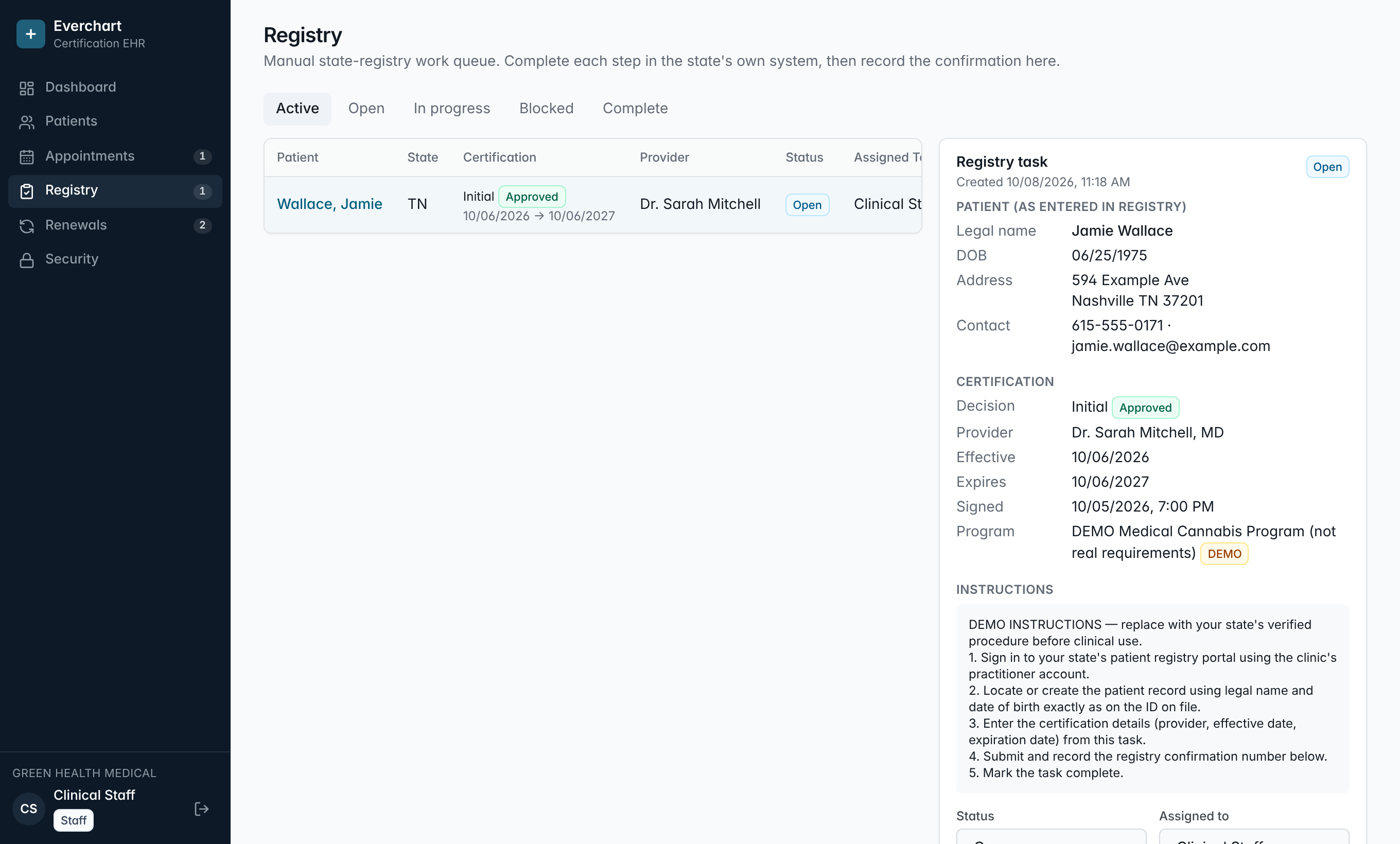
Nothing falls through
Every approved certification produces a task, so there is no separate list to keep in sync.
Your state's steps
Instructions come from the program you configure, written in your own words.
Clear ownership
Assign tasks, see who completed them and when, and track blocked items with a reason.
Proof of completion
Record the confirmation number on the task. Completion is written to the audit log.
How it works
- 1Provider signs an approved certification.
- 2A registry task is created with patient and certification details.
- 3Staff complete the state's registry steps in the official system.
- 4Staff record the confirmation number and mark the task complete.
Common questions
Does it submit to my state's registry automatically?
No. State systems differ and many prohibit automated access. Your staff stay in control and the software tracks the work.
Which states are supported?
Any state with a medical cannabis program. You configure your program's terminology, certification length and registry instructions.
More features
See it running with your clinic's workflow.
A 30-minute live walkthrough using your state's process. No slides.