Chart, sign and certify in one screen.
Everchart's encounter screen puts the patient's history, medications, allergies and documents on the left, a SOAP note in the middle, and appointment, intake completeness and certification status on the right. Signing locks the note. Later changes become dated amendments with the original preserved. Only providers can record and sign certification decisions, and the software never suggests or automates eligibility.
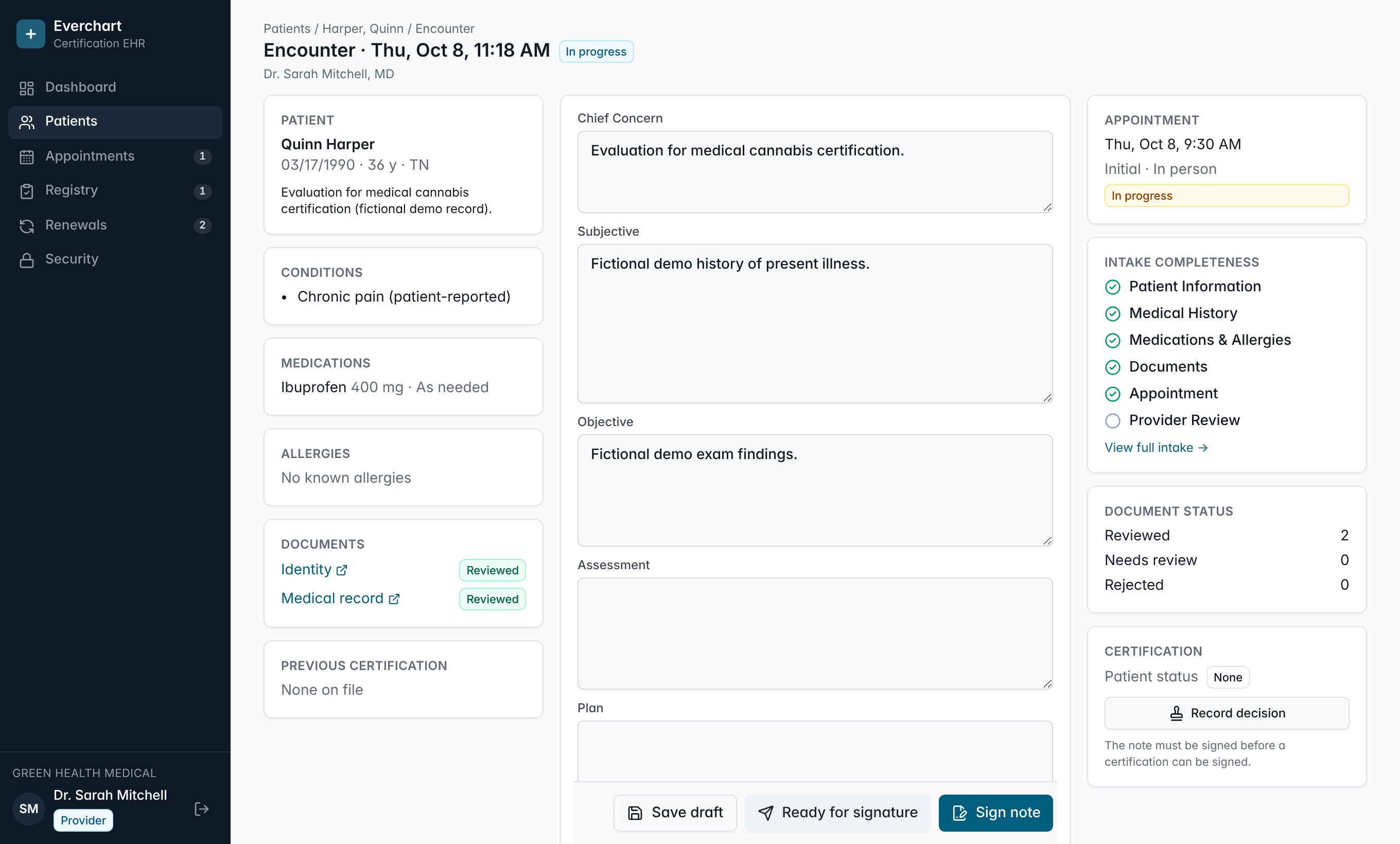
Everything on one screen
History, uploads and the note side by side, so providers are not clicking through tabs during the visit.
Locked signatures
Signed notes cannot be edited or deleted, even with direct database access.
Amendments, not overwrites
Changes after signing are added as new dated versions and the original stays intact.
Provider-only decisions
Certification type, decision and dates are always the provider's explicit choice.
How it works
- 1Open the encounter from today's schedule.
- 2Review intake, history and documents on the same screen.
- 3Write and sign the note.
- 4Record and sign the certification decision.
Common questions
Does the software recommend whether to certify?
No. There is no eligibility algorithm. Clinical judgment stays with the provider.
Can staff edit a provider's note?
No. Staff can view notes. Only the authoring provider can sign, and signed notes are locked.
More features
See it running with your clinic's workflow.
A 30-minute live walkthrough using your state's process. No slides.